
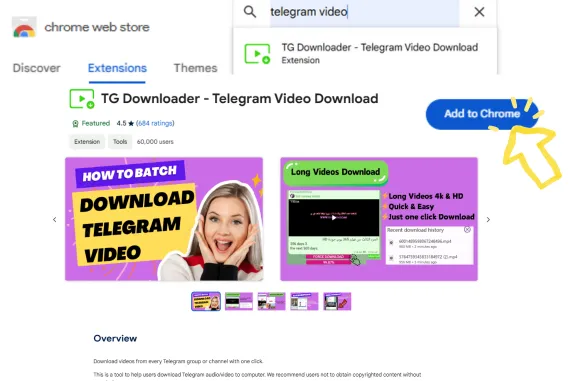
Step 1
adım1:Eklentiyi yükleyin
Chrome Web Mağazası'nda [Telegram Video Download] araması yapın ve Chrome eklentisini yükleyin.
Telegram video indirici, özel veya herkese açık kanallardaki Telegram videolarını orijinal kalitede, tek tek veya toplu olarak kaydetmenize yardımcı olur. Şifre gerekmeden hızlı, sınırsız ve kolay indirmelerin keyfini çıkarın!
Sınırsız ve yüksek hızlı, tek tıkla kolay indirme.

4 Steps
Step 1
Chrome Web Mağazası'nda [Telegram Video Download] araması yapın ve Chrome eklentisini yükleyin.
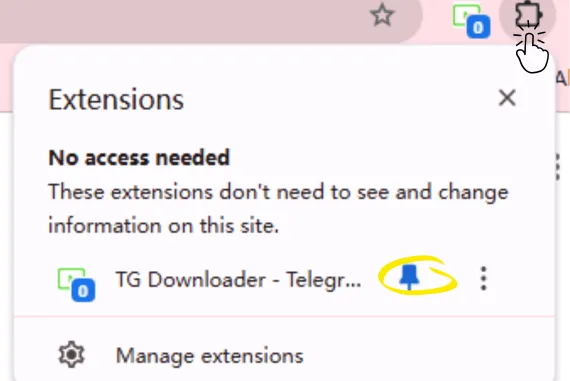
Step 2
Avatarın yanındaki 'Uzantılar' düğmesine tıklayın, eklentiyi seçin ve araç çubuğuna sabitlemek için sağdaki 'Sabitle' simgesine tıklayın.
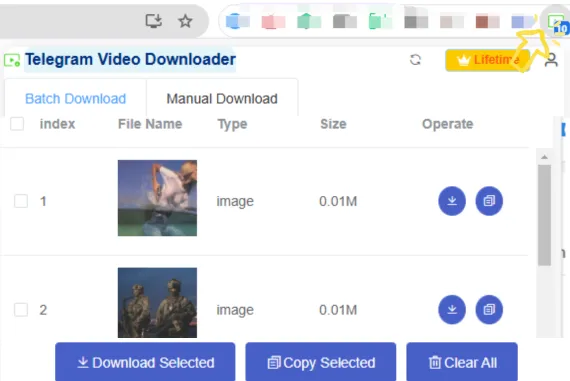
Step 3
Araç çubuğundaki eklenti simgesi, yakalanan kaynakların sayısını gösterecektir. Araç çubuğundaki eklenti simgesine tıklayın, eklenti penceresini açın ve toplu indirme yapın.
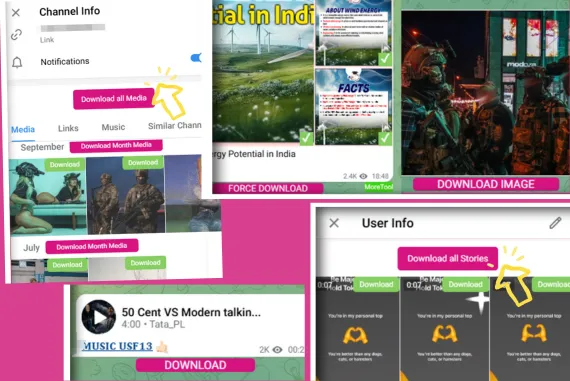
Step 4
Toplu indirme: Grup mesajlarını veya kişisel mesajları açın ve Toplu Medya İndir/Hikaye İndir düğmesine tıklayın. Tekli indirme: Kanal veya grup sohbet penceresinde İndir/Zorla İndir/Görsel İndir/Video İndir düğmesine tıklayın
Telegram İndirici, Telegram mesajlarından ve kanallarından fotoğraf, video, ses ve belgeler indirmenize yardımcı olan güçlü bir araçtır. Kullanıcı dostu bir arayüz ve yüksek hızlı indirme özellikleri sunarak içeriği hızlı ve kolay bir şekilde kaydetmenizi sağlar.
Kayıt olmanıza gerek yoktur. Telegram Video İndiriciyi hesap oluşturmadan veya giriş yapmadan kullanabilirsiniz.
Telegram Video İndirici; fotoğraflar (JPEG, PNG, GIF), videolar (MP4, AVI, MKV), ses (MP3, WAV, AAC) ve belgeler (PDF, DOCX, XLSX, PPTX) dahil olmak üzere birden fazla dosya türünü destekler.
Herhangi bir sorunla karşılaşırsanız müşteri destek ekibimizle iletişime geçin. Sorunları çözmenize ve sorunsuz bir kullanıcı deneyimi yaşamanıza yardımcı olmak için 7/24 teknik destek sunuyoruz.
Evet. İş akışı verimliliğini artırmak için birden fazla dosya seçip tek seferde toplu olarak indirebilirsiniz.
TG Downloader
Sınırsız ve yüksek hızlı, tek tıkla kolay indirme.